Requirements
This site describes the requirements to use the script properly.
Infrastructure
Azure Services
You need the following Azure Services for this script:
- Microsoft Defender (and Advanced Hunting)
- Azure Automation Account with a PowerShell 7.4 Runtime Enviroment
- Azure Log Analytics Workspace with a data collection rulle
Asset Management
To use this script properly, you need a centralized Asset Management with at least the following fields:
- Hostname
- Serverowner / Serverowneremail
Without these two fields, it is not recommended to use this script (unless one person should get and manage all Planner Tasks). Obviously, you can include any other fields you want!
To use the Asset in Advanced Hunting, it is recommended to ingest it to a custom table in a log analytics workspace.
Office Ressources
This script creates Planner Tasks, so you need at least a Planner Plan. To find the Planner Plan faster, I recommend adding the Plan to a Team.
Here’s how you can create a Planner Plan and add it as a tab to a Team Channel:
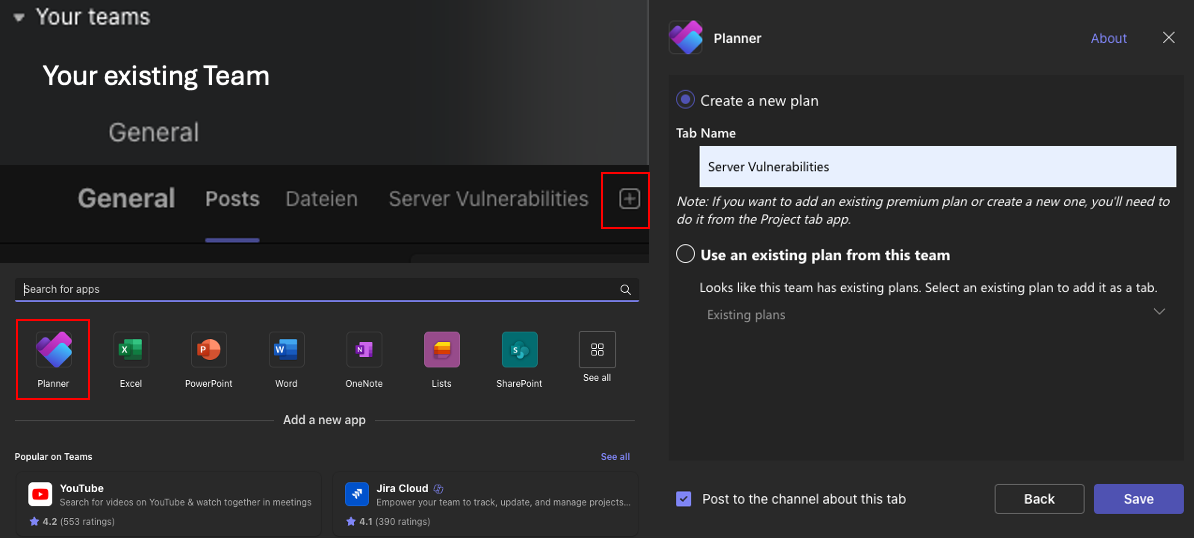
- search the team
- click on the channel
- click on the “+” to add a new tab/app
- click on planner
- create new plan or use an existing plan
- save
Permissions
EntraID or Defender Roles
You need one of the following EntraID / Defender roles to be able to run a query in the Advanced Hunting Portal:
- Global Administrator (EntraID)
- Security Administrator (EntraID) - recommended
- Security Operator (EntraID)
- Microsoft Defender for Endpoint Administrator (Defender)
Rights for automation account
The managed Identity / Service Principal of the automation account needs the following permissions on the ressources:
- Microsoft Graph
- User.Read.All
- Tasks.ReadWrite.All
- ThreatHunting.Read.All
- Mail.Send
- Azure Log Analytics
- Monitoring Metrics Publisher on the data collection rule
You have to add the API permissions to Graph API to the “Enterprise App” that has the same name as the automation account. How do I do this?
PowerShell Modules
| Module Name | Purpose | Version |
|---|---|---|
| Microsoft.Graph.Planner | creating MS Planner Tasks with MsGraph API | 2.34.0 |
| Microsoft.Graph.Authentication | authenticating in MsGraph | 2.34.0 |
| Microsoft.Graph.Security | run Advanced Hunting Queries with MsGraph | 2.34.0 |
| Microsoft.Graph.Users | get Account Data | 2.34.0 |
| Az | use other modules and login with a Managed Identity | 12.3.03 |
| SVN.PSCore | create vulnerability notifications & get vuln. data, invoke array into log analytics | 1.6.6 |
All Az-modules are pre-installed in the Automation Account.